
Runtime Warning Guide
Yeow has a built-in early warning engine (enabled by default, profile.warnings-enabled: true), detecting abnormal behavior with a once-per-second window aggregation, outputting bilingual warnings (Chinese and English) in the console, helping developers and server owners quickly locate performance issues.
All warnings are not fatal errors and will not cause server crashes. If you're not the developer of the corresponding plugin, you can ignore them.
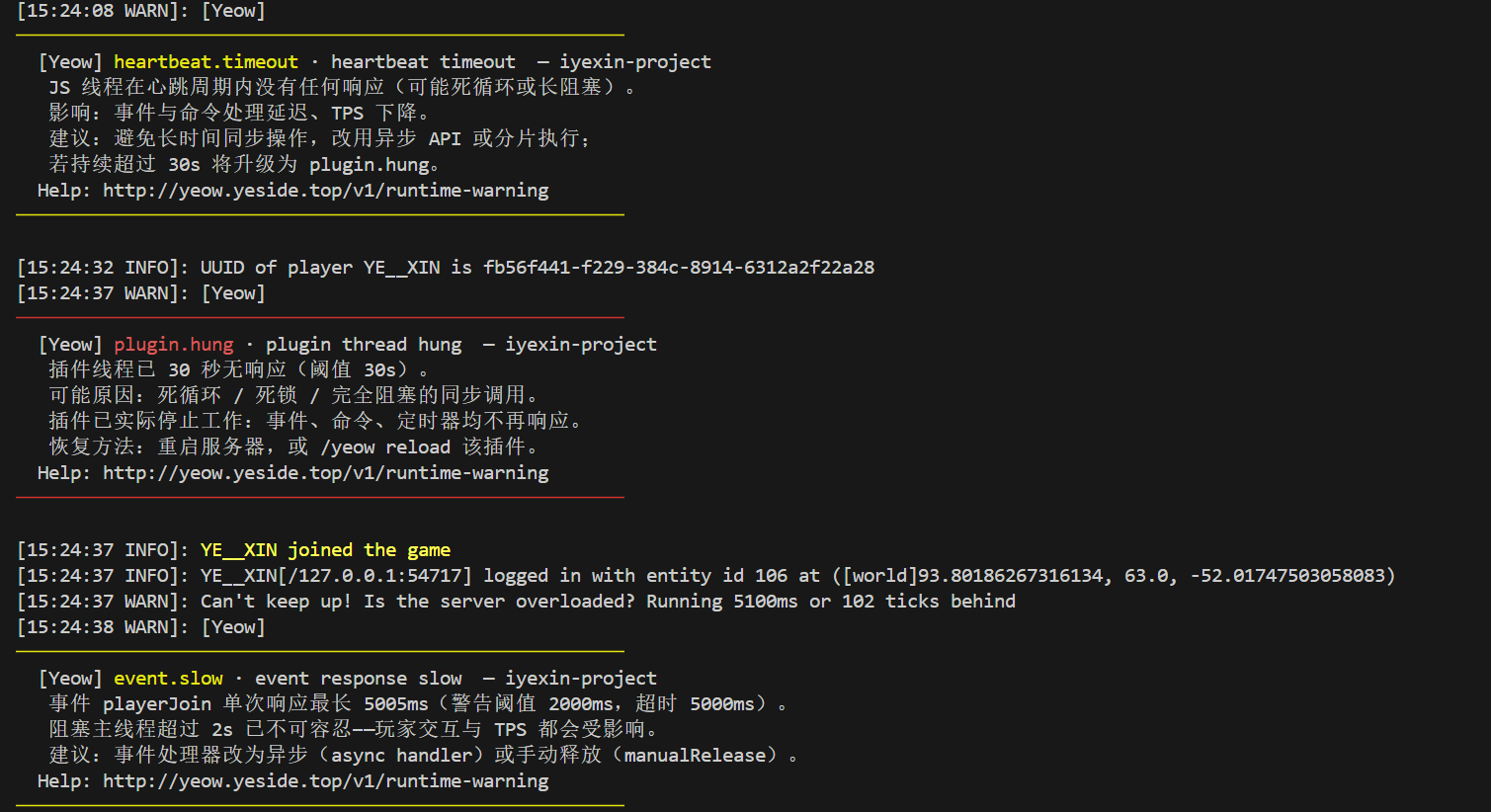
Output Style: Alerts are compact paragraphs wrapped in two colored separator lines (critical=red / warning=yellow / info=blue), adapting to different terminal widths.
Scheduling Semantics (Prerequisite for Understanding Alerts)
The three-level scheduling queues have different semantics, detection and alerts only target real-time queues:
| Queue | Carries | Allows Backlog? |
|---|---|---|
| HIGH / NORMAL | Real-time and interactive response (commands, events, async API) | ❌ Should not backlog — backlog is a problem |
| LOW | Large batch repetitive tasks (auto-demoted / manually specified low) | ✅ **Allows backlog and delayed completion |
Therefore: All "backlog/saturation" type alerts only count HIGH/NORMAL; LOW queue backlog and delay are design semantics, not alerted, not counted in health score.
Alert Types
| Code | Severity | Trigger Condition | Data Source |
|---|---|---|---|
heartbeat.timeout | Warning 🟡 | JS thread single heartbeat roundtrip >200ms | Heartbeat ping |
plugin.hung | Critical 🔴 | JS thread >30s continuous no response | Heartbeat ping |
event.slow | Warning 🟡 | Event response >2s (not timed out) | Event bridge |
event.timeout | Warning 🟡 | Event wait timeout (5s, force-released) | Event bridge |
tab.slow | Warning 🟡 | Completion response >500ms (not timed out) | Command bridge |
tab.timeout | Warning 🟡 | Completion wait timeout (1s, returned empty list) | Command bridge |
budget.congested | Warning 🟡 | Recent 40 ticks HIGH/NORMAL backlog ≥ 35 times | Scheduler |
budget.restored | Info 🔵 | Consecutive 40 ticks no backlog, budget restored | Scheduler |
scheduler.saturated | Warning 🟡 | HIGH/NORMAL execution time >80% of tick duration | Scheduler |
Event 2s Warning vs 5s Timeout (Design Semantics)
- 2s (
event.slow): Blocking main thread for 2 seconds is intolerable — even if event eventually completes, player interaction and TPS are already degraded, developers must take seriously - 5s (
event.timeout): Runtime's wait limit, once reached event is force-released (previous cancellation/modifications take effect)
Two independent alerts: slow but completed → event.slow; timeout → event.timeout.
Detailed Alert Explanations
heartbeat timeout
Detection Mechanism: Yeow sends one heartbeat ping to each plugin JS thread per second. Triggered by either:
- No response at all — No pong received within window after ping sent (infinite loop, long block)
- Slow response — Single roundtrip exceeds 200ms
Virtual plugins (Worker) do not trigger this alert by default: Workers typically handle compute-intensive tasks; prolonged JS thread occupation without responding to heartbeats is expected behavior (
plugin.hungstill uses original detection logic).
Meaning: Plugin JS thread temporarily blocked (detectable in 1-2 seconds in no-response scenarios; upgrades to plugin.hung after 30s). Possible causes:
- Long synchronous loops (e.g., iterating over large numbers of chunks setting blocks)
- Synchronous IO operations blocking the event loop
- Large message backlog
Solutions:
- Check for long synchronous loops → switch to async operations
- Check for synchronous network/file IO → Use async API
event slow / event timeout
Detection Mechanism: Event handler single response >2s → event.slow; wait >5s force-released → event.timeout.
Meaning: Event processing logic blocked main thread. Main thread cannot execute other tasks while spinning waiting for JS results.
Solutions:
- Use
asynchandler (immediately releases event, logic executes asynchronously) - Split heavy logic into segments after
setTimeout/await
// ❌ Long synchronous operation blocks main thread
eventWatch('playerJoin', (e) => {
    const data = heavySyncCalculation(); // Takes 3s → event.slow
    e.player.sendMessage(data);
});

// ✅ Returns Promise, immediately releases event
eventWatch('playerJoin', (e) => {
    return Promise.resolve().then(() => {
        const data = heavySyncCalculation();
        e.player.sendMessage(data);
    });
});
tab slow / tab timeout
Detection Mechanism: Completion callback >500ms → tab.slow; wait >1s → tab.timeout (returns empty list).
Meaning: Completer takes too long, causing lag when player inputs commands.
Solutions: Optimize completer; cache results.
plugin thread hung
Detection Mechanism: Consecutive >30s no heartbeat response.
Meaning: JS thread stuck in infinite loop / deadlock / complete block, plugin functionality completely stopped.
When a hang occurs, the runtime follows Unload and Forced Termination (prefer graceful unload; otherwise controlled forced termination): graceful exit (wait for unloadDone) → timeout → forced termination (uncatchable interrupt + grace period) → abandon and quarantine (create a fresh execution unit if a reload is required).
Put cleanup logic in
onUnload— forced termination is uncatchable, so JScatch/finallyare not guaranteed to run.
Solutions: Check for exitless while(true) in onLoad/onInit; avoid catastrophic regex backtracking and huge JSON; move heavy computation to native services; /yeow reload or restart server.
budget.congested / budget.restored (real-time queue backlog)
Detection Mechanism: Recent 40 ticks HIGH/NORMAL queue backlog count ≥35 (sliding window, backlog-threshold).
Meaning: Task submission speed exceeds processing capacity, real-time interaction degraded. Runtime will automatically expand tick budget (see Dynamic Expansion); recovers and alerts after backlog cleared.
LOW batch queue not counted — large batch repetitive tasks allow backlog and delay.
Recommendation: If operations are heavy (e.g., triggering chunk generation), manually declare low priority — all task channel API methods support trailing task configuration
{ priority: 'low' }(e.g.,await world.getChunkAt(x, z, { priority: 'low' })), putting heavy tasks in LOW queue, avoiding crowding out real-time interactions and triggering this alert. See Advanced Knowledge - Priority Parameters.
scheduler.saturated
Detection Mechanism: HIGH/NORMAL execution time within a window exceeds 80% of tick total duration.
Meaning: Real-time scheduling near capacity, LOW batch tasks will be indefinitely postponed, interactive response degraded.
Configuration
All thresholds and strategies configured in plugins/Yeow/runtime/config.yml:
profile:
  warnings-enabled: true            # Early warning engine (enabled by default; independent of full analysis)
  warn-cooldown-seconds: 1800       # Same-type alert cooldown (30min)
  latency-warn-threshold-ms: 200    # Heartbeat timeout threshold (ms)
  event-slow-threshold-ms: 2000     # Event response warning threshold (ms; timeout still 5000)
  tab-slow-threshold-ms: 500        # Completion response warning threshold (ms; timeout still 1000)
  callback-timeout-event-ms: 5000   # Event callback wait limit (ms, runtime effective)
  callback-timeout-tabcomplete-ms: 1000 # Completion wait limit (ms, runtime effective)
  suspend-warn-seconds: 30          # Plugin hang detection threshold (s)
  backlog-threshold: 35             # Expansion signal: backlog count threshold in 40 ticks
  backlog-window-ticks: 40          # Backlog statistics window
  scheduler-saturation-pct: 80      # Scheduler saturation alert percentage
callback-timeout-*is runtime behavior (actual wait limit for event bridge/command bridge);*-slow-threshold-*is alert threshold (earlier warning, but doesn't affect behavior).
Alert Cooldown Mechanism
Cools down by (code, plugin) granularity: Same plugin same code alert outputs at most once during cooldown period; different plugins/different codes don't affect each other. Cooldown defaults to 30 minutes.
Dynamic Expansion
Runtime component (independent of early warning engine) automatically adjusts tick budget, enabled by default:
- Expansion signal: Recent 40 ticks HIGH/NORMAL backlog ≥35 times (
backlog-threshold) → Budget ×1.3 (exponential stacking, limit 3.0x) - Degradation: Consecutive 40 ticks no backlog → Gradually ÷1.3 back to baseline
- Reach limit: Still backlog after reaching limit → Output critical warning
profile:
  scaler:
    enabled: true              # Whether to enable dynamic expansion
    expansion-factor: 1.3      # Expansion multiplier each time
    max-multiplier: 3.0        # Maximum expansion limit (3x = 60ms/tick)
Full Analysis (profile.enabled)
/yeow profile and /yeow track require profile.enabled: true (disabled by default, avoiding per-task collection overhead). When enabled:
- Per-task/per-plugin time breakdown, task heatmap
/yeow profileoutputs health score + real-time/batch queue metrics + per-plugin breakdown, saves detailed report file/yeow track <plugin> <seconds>single plugin deep tracking
Early warning engine does not depend on this switch.
FAQ
Q: Heartbeat timeout 200ms is very strict, should it be relaxed?
200ms is reasonable: Async IO and async API don't affect heartbeat response. If confirmed no issue, ignore single warnings within cooldown period, or increase latency-warn-threshold-ms.
Q: Is event 2s warning too strict?
This is intentional design: Blocking main thread for 2s is enough to cause noticeable lag. event.slow is just a reminder, won't force-release event; only 5s timeout will. If plugin has legitimate long tasks, should switch to async handler to release main thread, not relax threshold.
Q: Will LOW queue backlog trigger alerts?
No. LOW queue carries large batch repetitive tasks, allows backlog and delayed completion — this is design semantics. If LOW tasks long-term not executing, check if real-time queue is saturated (scheduler.saturated).
Q: Will plugin thread hang automatically recover?
Usually not — an infinite loop does not exit by itself. The runtime follows Unload and Forced Termination: graceful exit → timeout → uncatchable interrupt + grace period → abandon and quarantine (rebuilding a fresh execution unit if a reload is required). A pure JS infinite loop is aborted by the interrupt; a thread stuck in an uninterruptible native operation (catastrophic regex, huge JSON, etc.) may only be reclaimed when it returns (abandonment is temporary). Development supports hot reload; production uses /yeow reload or a server restart.
Q: How to completely disable certain type of alert?
Set profile.warnings-enabled: false to disable entire early warning engine (full analysis unaffected); or increase corresponding threshold to indirectly disable.
More Information
- Getting Started — Basic usage
- Advanced Knowledge — Architecture and thread model
- CLI Reference — Command usage