
CLI Reference
create-yeow
npm create yeow@latest [-- options]Create Yeow plugin project.
Parameters
| Parameter | Description |
|---|---|
-y | Non-interactive mode, use defaults |
--name=<value> | Project name (default my-yeow-plugin) |
--author=<value> | Author name |
--js | Generate JavaScript project (default) |
--ts | Generate TypeScript project |
--no-typecheck | Skip type checking (TS only) |
Language Selection
In interactive mode, use Tab to switch, Enter to confirm JavaScript or TypeScript:
▸ JavaScript ◂ TypeScript ← Tab to switch, Enter to confirmDefault JavaScript. TypeScript projects automatically run tsc --noEmit type checking during build, can be disabled in yeow.config.json with "typecheck": false.
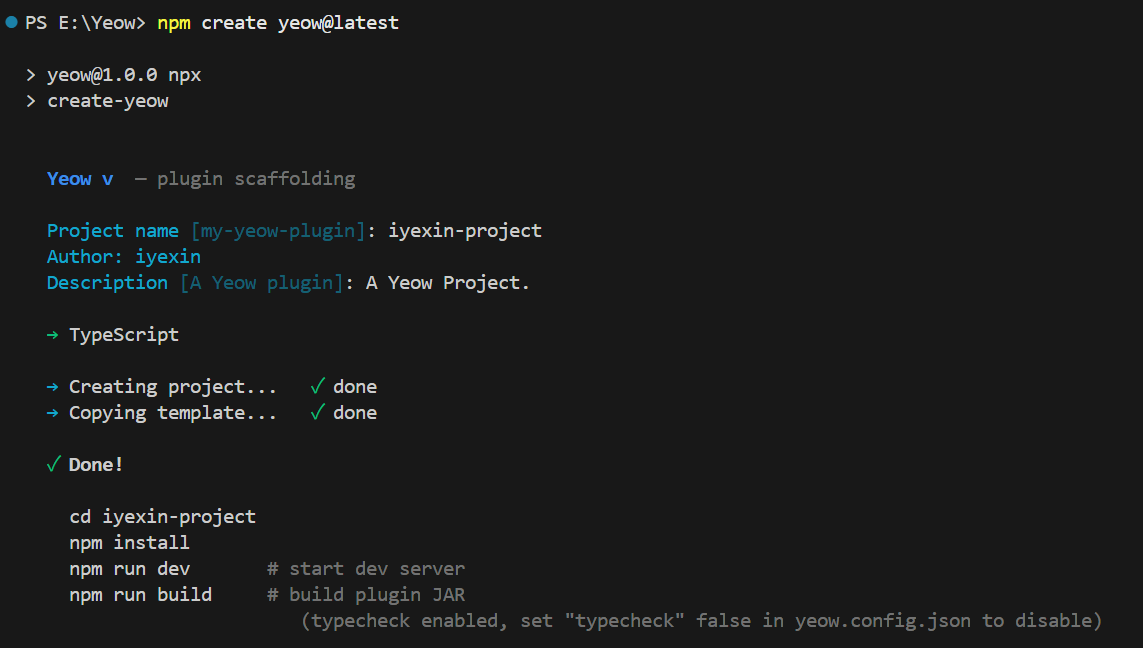
Examples
npm create yeow@latest -- -y                    # JS project (default)
npm create yeow@latest -- -y --ts               # TS project
npm create yeow@latest -- -y --name=survival --author=Notch
Development Server
npm run dev [-- options]Start Paper test server + hot reload. npm run dev automatically adds -Dyeow.dev=true to enable development mode, npm run build builds production package without this flag.
Parameters
| Parameter | Description |
|---|---|
-y | Skip prompts, auto-accept EULA |
--stop=<N><s|m|h> | Auto-stop, e.g., 60s, 5m, 2h |
AI Debug Workflow (headless mode)
For AI agents / CI: Auto-accept EULA → Download server → Start → Detect load complete → Wait then command auto-ends. Any AI parameter triggers headless mode (no WebSocket/hot reload):
npm run dev -- --eula --keep --timeout=2m --wait=30s --outfile=log.txt| Parameter | Description |
|---|---|
--eula | Auto-accept EULA (required for headless) |
--timeout=<N><s|m|h> | Load timeout (default 2m): Time limit from start to load complete (Done (...)!); timeout exits directly and suggests checking network or increasing timeout |
--wait=<N><s|m|h> | Wait after successful load (default 30s): Command auto-ends when time is up (control returned to AI) |
--outfile=<path> | Server log output file (default outputs to console) |
--keep | Keep server subprocess after command ends (otherwise closes) |
Flow and output:
- Output
Server PID: <pid>(server java process) Downloading/preparing server...— Download Paper (skip if cache hit)- Detect
Starting org.bukkit.craftbukkit.Main→ Output "Starting load" - Detect
Done (x)! For help, type "help"→ Output "Load complete — waiting N s then command ends" and start timer --waittime up → Output log location and PID, command auto-ends (--keepkeeps server running, close by PID)
Workflow: Run above command → After successful load check
--outfilelog (or wait for command to end then manually check) → When no longer needed kill process byServer PID(kill <pid>/ Task Manager). Timeout troubleshooting:--timeouttimeout suggests checking network issues (Paper download) or increasing timeout.
Workflow
- Check local Paper development version cache (default
1.21.4, configurable inyeow.config.json'spaperVersion/paperJar), download if not present - Start WebSocket server (port 17368)
- Start Paper server in development mode (
-Dyeow.dev=true) - Build plugin: Generate
.yeow/dev.json(with source paths) instead of packaged code; Deploy.yeow.zip(with dev.json) toplugins/Yeow/(dev-server auto-creates this directory, runtime auto-scans and loads) - Java runtime connects to dev-server via WebSocket
- Monitor
src/+assets/file changes → Auto re-package → Send hot reload message via WebSocket - Runtime receives message → Destroy old QuickJS context → Load new code → Hot reload complete
- Development mode
assetsAPI reads directly from filesystem directory, no packaging needed
Plugin remains running during hot reload, no
/reloador server restart needed.
If old version of same-name template JAR exists in
plugins/(legacy from early version deployment) in development mode, dev-server automatically removes it to avoid conflict with.yeow.zipinplugins/Yeow/.
yeow.config.json fields that affect npm run dev
| Field | Default | Description |
|---|---|---|
dev.port | 17367 | Dev server listen port |
dev.memory | 4G | Dev server JVM heap limit (-Xmx / -Xms). Lower it on memory-constrained machines |
dev.paperVersion | 1.21.4 | Used to resolve a Paper build when paperJar is absent (PaperMC Fill API v3, newest build) |
dev.paperJar | a pinned 1.21.4 download URL baked into the template | Direct URL or local path; takes precedence over paperVersion, needs no API |
java | 21 | Minimum JDK major required by the host platform: dev-server checks it before starting and fails fast instead of letting the server throw an obscure error |
JDK resolution:
$JAVA_HOME/bin/java(JBR excluded — Android Studio's bundled runtime crashes the server JVM) →javafrom PATH.
Debug Experience
In development mode (npm run dev), dev-server provides complete error location experience. The following capabilities are only enabled in development environment (-Dyeow.dev=true) — production builds don't carry source-map, don't capture async stacks, errors only output to server logs.
Source Map
Plugin source code is packaged by esbuild into dist/.dev/main.js (with main.js.map). After runtime errors are reported to dev-server via WebSocket, source-map library reverse-resolves compiled positions back to original source code:
   JS Error [my-yeow-plugin]
  'test1' is not defined
  at src/index.js:29:0
        27| });
        28|
    →   29| test1();
        30|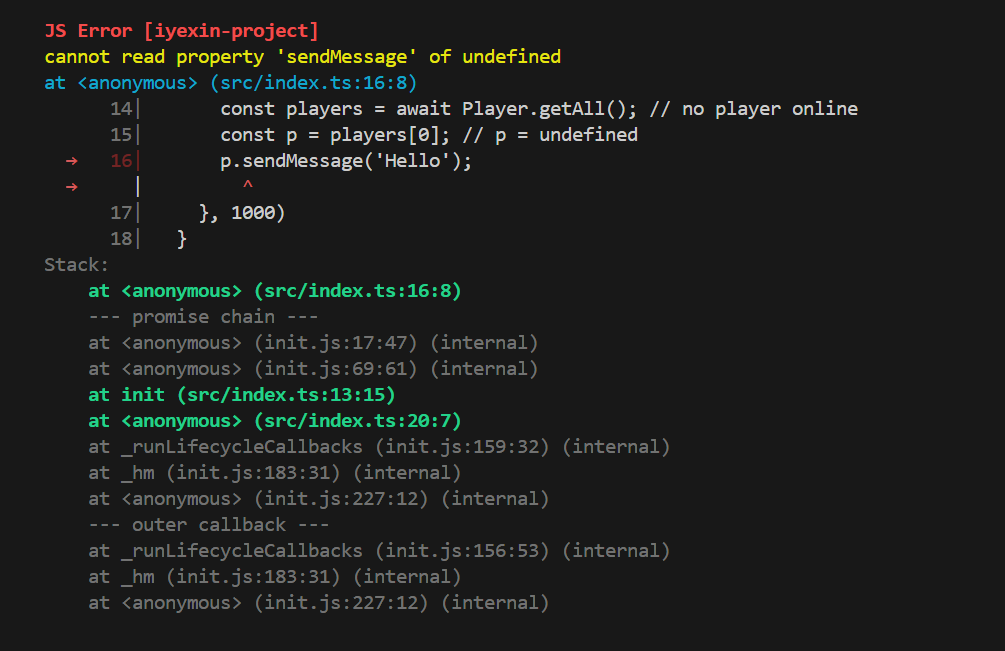
- Automatically locates error frame in user source code, shows error line ±3 lines context with
→locator - Line/column numbers correspond directly to real code in
src/, not build artifacts
Async Call Stack Tracing
Async errors are hard to locate: Error occurs in callback or microtask, but the problem is in the code line that registered the async call. Yeow rebuilds complete async call chain in development mode, appending to error message tail:
Stack:
    at <anonymous> (src/index.js:56:10)            ← Error throw point
    at <anonymous> (init.js:262:41) (internal)     ← Runtime internal frame (grayed)
    --- promise chain ---
    at <anonymous> (src/index.js:55:29)            ← .then call point
    at doSomething (src/index.js:53:15)            ← Callback registration point (user frame)
    at <anonymous> (src/index.js:61:14)            ← onLoad callback
    at _runLifecycleCallbacks (init.js:154:32) (internal)
    --- outer callback ---
    at doSomething (src/index.js:53:15)            ← Outer callback registration point
    at <anonymous> (src/index.js:61:14)
Mechanism (only enabled in development environment):
- Registration stack: Each callback (timer / event / command / async request) captures complete user call stack at registration
--- promise chain ---: InterceptsPromise.prototype.then(only$dev) — covers.thenhandler itself throwing errors, and call points at each link when rejection propagates along chain;.thenexecuting in callback/microtask context automatically inherits that callback's user chain--- outer callback ---: Multi-layer callback nesting (e.g.,setTimeoutwrappingsetTimeout) restores outer callback registration points layer by layer- Recent callback context:
.theninitiated in microtask afterawaitresume can also connect to the callback's user call chain that initiated it; non-callback messages (LOAD etc.) clear context to avoid misattribution
Known boundary: Statements after
awaitare scheduled by engine internals, intermediate call frames between async functions cannot be reconstructed (JS engine doesn't preserve call stack across await boundaries) — but "error throw point + registration chain" remain intact on both ends, sufficient to locate the problem.
TIP
Paths in stack (e.g., src/index.js:56:10) are real source code positions after source-map reverse resolution — can directly Ctrl + click (VS Code, WebStorm, IntelliJ IDEA etc.) in most modern editor built-in terminals to jump to corresponding code line.
WARNING
Async stack tracing reduces performance in development mode: Each additional callback / .then chain layer reduces performance by about 10% (stack capture cost). Production mode has no overhead (no interception, no stack capture, no source-map), no need to worry.
Auto Highlighting and Code Filtering
- User code (frames under
src/) — bold highlighted, with source context and locator - Dependency packages (frames in
node_modules/, likeyeow-api) — grayed but retained, for understanding call chain - Internal implementation (runtime internal frames like
init.js/unknown.js) — grayed and marked(internal) - Error body automatically takes first user code frame as context (degrades to normal stack output if not found)
Manual Error Reporting
In catch block, use logError(err, context?) to actively report (context is optional additional description, appears at report header):
import { logError } from 'yeow-api';

try {
    await someOperation();
} catch (e) {
    logError(e, 'someOperation failed for player ' + player.name);
}
Error sent to runtime via debug channel: In development mode forwarded to dev-server for source-map resolution (enjoying all above experience), in production mode outputs to server log ([PluginName] JS Error: ..., with filename/line number and first 3 stack frames).
Note: When runtime errors occur,
--- runtime executer error(for reference) ---section is Java-side executor's complete stack, for reference only — for troubleshooting business logic, refer to above--- promise chain ---/--- outer callback ---sections.
runtime executer error section shouldn't be seen by you, if you really see it, report issue to Yeow project (Yeow runtime error).
Performance Analysis
Complete documentation for runtime health detection (early warning engine) and full performance analysis (/yeow profile / /yeow track) see Runtime Warning Guide.
Permission Calculation
npm run permissionsRead-only calculation (writes back to yeow.config.json's computedPermissions field): Merges permissions declared by main project and all dependency packages (dedup + wildcard normalization), prints final permissions and source distribution (which package each permission comes from), for troubleshooting permission gaps and redundancy. Complete reference see Permissions & Native Service Trust.
Build
npm run build- TypeScript projects automatically run
tsc --noEmittype checking (can be disabled viayeow.config.json'stypecheckfield) - esbuild packages
src/index.ts(orindex.js) →.yeow/main.js(production) /.dev/main.js(development) - Resource files (
import './assets/icon.png') copied by dependency namespace todist/.assets/<id>/(production) ordist/.dev/.assets/<id>/(development) - Read template JAR from
.yeow/assets/ - Inject
main.js+yeow.json+plugin.yml+ all resource files - Output to
dist/<name>-<version>.jar+.yeow.zip(production) /dist/plugins/<name>-<version>.jar+.yeow.zip(development, zip contains.yeow/dev.json) - Production mode additionally generates platform-independent plugin package
dist/<name>-<version>.yeow.zip(.yeow/main.js+assets/+yeow.json, no template class) — place inplugins/Yeow/for auto-scan loading, or/yeow loaddynamic loading
Development mode build artifacts placed in
dist/.dev/, isolated from productiondist/.yeow.config.json'spermissionsfield writes toyeow.json, as plugin's permission declaration when loading.
Distribution: Comparison of two artifacts and Modrinth etc. platform upload recommendations,
/yeow install <url>one-click installation, see Build & Distribution.