
Quick Start
Yeow Beta is now available on PaperMC Hangar: https://hangar.papermc.io/iYeXin/Yeow/versions
TIP
AI-Assisted Programming: This page is for human reading. If you're using an AI programming assistant (Codex, OpenCode, DSH and other Harness products), it's recommended to first have the AI read the AI-Assisted Startup Guide — in any Harness product, copy this link or page content to the AI, and describe your needs (e.g., "create a plugin with a /back command"), the AI will guide you through project creation, development, and debugging. Complete documentation can also be downloaded as a package (docs.zip) to feed to the AI.
NOTE
The API is asynchronous throughout: read and write fields with await player.getXxx() / await player.setXxx(v), and use await player.snap() when you need several fields at once. Blocking calls occupy the plugin's JS thread, so keep handlers and command executors on await.
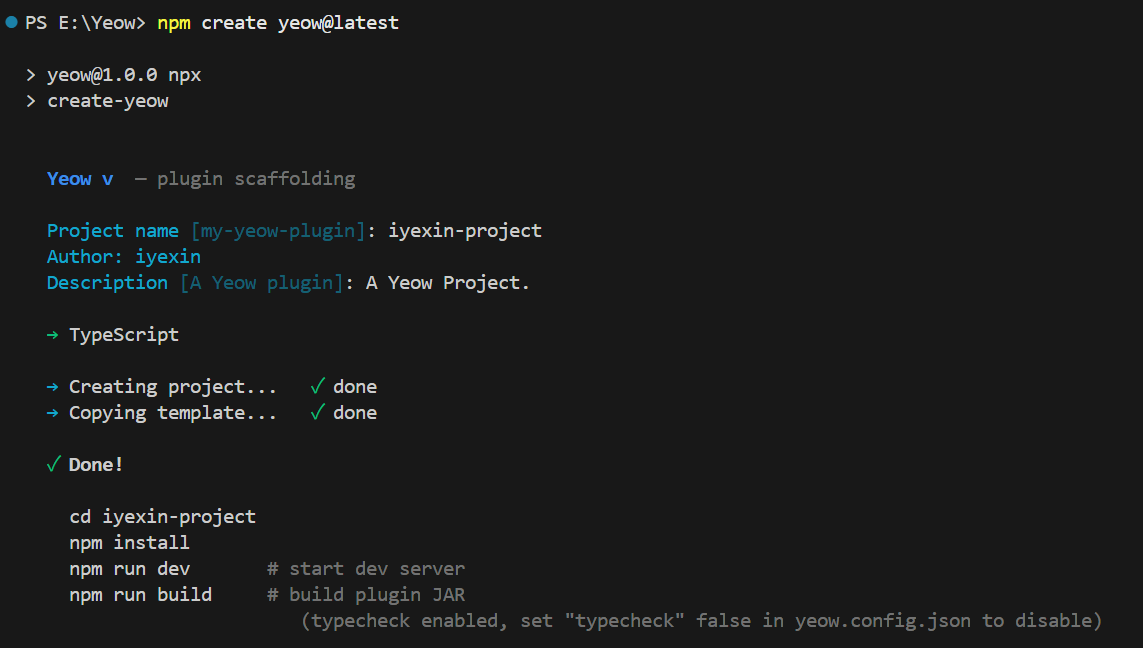
Create Project
npm create yeow@latest -- -y               # JavaScript (default)
npm create yeow@latest -- -y --ts          # TypeScript
cd my-plugin
npm install
IMPORTANT
It is strongly recommended to use TypeScript first — especially for AI-assisted programming: complete type inference (command parameters, event payloads, API return values) gives editors and AI perfect type support, eliminates static errors, and significantly reduces "model hallucinations" (inventing non-existent APIs/fields/types). npm create yeow@latest -- -y --ts creates in one step.
Development
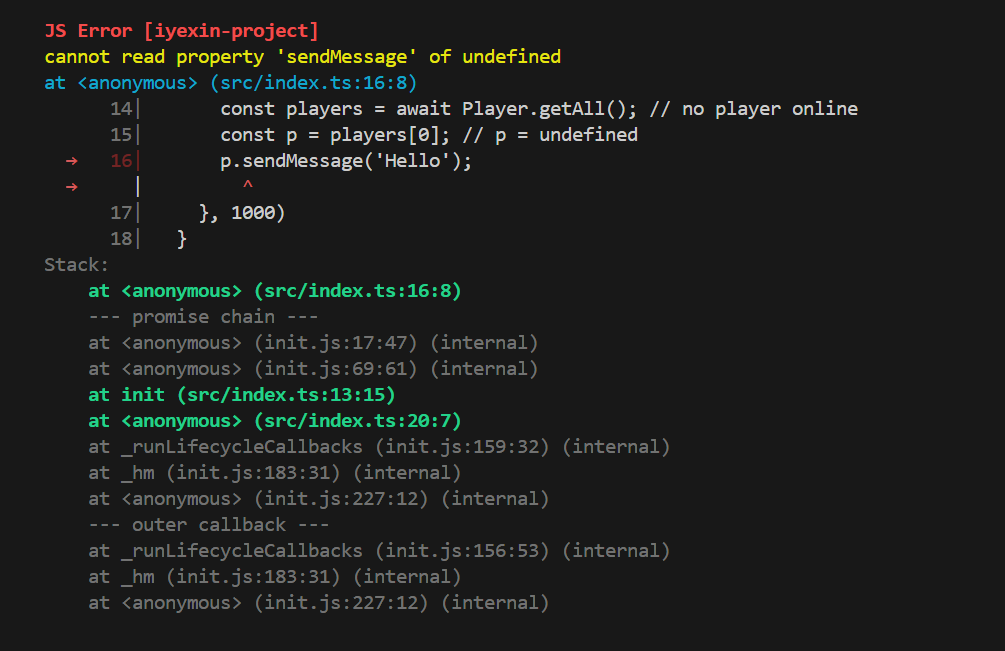
npm run dev # Start Paper server + hot reloadEditing files under src/ or assets/ automatically triggers hot reload without restarting the server.
In development mode, runtime errors automatically locate to source code positions (source-map reverse resolution) with complete async call chains, displayed directly in the terminal:
Build and Deployment
npm run build # Production artifacts → dist/<name>-<version>.jar + .yeow.zipnpm run build produces two deployment forms:
| Artifact | Description |
|---|---|
dist/<name>-<version>.jar | Standard Paper JAR (includes Bootstrap class + depend: Yeow), place in plugins/ to run |
dist/<name>-<version>.yeow.zip | Platform-independent plugin package (pure ZIP: .yeow/main.js + assets/ + yeow.json) |
Three deployment methods (choose one):
- JAR Method: Place
yeow-runtime-0.8.0.jarand plugin JAR together inplugins/(same as native Java plugin deployment) - Auto-scan: Place plugin
.yeow.zipinplugins/Yeow/, automatically loaded on server startup - Command Load: While server is running, execute
/yeow load <path|name>(local temporary load; if the path is not found, look up<name>-<version>.yeow.zipunderplugins/Yeow/),/yeow load <url>(download temporary load),/yeow install <url>(download and install toplugins/Yeow/),/yeow update <url>(replace old version)
Unique Instance per Name: Regardless of loading method, only one instance of a plugin name can exist — duplicate loading will be rejected with a warning.
Distribution Recommendation: Both artifacts should be uploaded (
.yeow.ziprecommended,.jarfor compatibility), with/yeow install <url>one-click installation provided. See Build & Distribution.
Platform-Independent (Paper / Folia dual-platform compatible):
.yeow.zipitself doesn't depend on Java or Paper series — any runtime implementing the Platform Specification (understanding package structure, scheduler, executor, JS bridge) can run the same plugin. The same plugin package can be directly interchanged between Paper and Folia servers: Folia servers only need to install the Folia version of Yeow Runtime (available on Hangar), plugins automatically enjoy Folia's multi-threaded advantages (see Advanced Knowledge · Folia). Paper series (Paper/Purpur/Leaf etc.) yeow-runtime is the official implementation example.
Project Structure
my-plugin/
├ src/
│  └ index.ts              ← Entry (TS default)
├ assets/                   ← Packaged resources (images, configs, native programs)
├ .yeow/                    ← Build scripts + Paper + Runtime JAR
├ dist/                     ← Build artifacts
├ yeow.config.json          ← Plugin configuration
├ tsconfig.json             ← TS mode only
└ package.json
First Plugin
Implement /back: Record player death location, type /back to teleport back.
import { onLoad, onUnload, registerCommand, eventWatch, Location, log } from 'yeow-api';
import type { PlayerDeathEvent } from 'yeow-api';

onLoad(() => {
  // Record all death locations and notify player
  eventWatch('playerDeath', async (e: PlayerDeathEvent) => {
    const loc = await e.player.getLocation();
    if (!loc) return;
    // PDC auto JSON serialization: directly store/retrieve objects (no need for manual JSON.stringify/parse)
    await e.player.setPdc('back.deathLocation', {
      x: loc.x, y: loc.y, z: loc.z, world: loc.world,
    });
    await e.player.sendMessage(
      `<red>You died!</red> <gray>Use</gray> <click:run_command:/back><aqua><u>/back</u></aqua></click> <gray>to return</gray>`,
    );
  });

  // /back — Return to death location
  registerCommand('back', {
    description: 'Teleport to your death location',
    permission: { node: 'back.use', default: 'all' },   // Declare permission node: all players default, server admin can manage via permissions plugin
    executor: async (p) => {
      if (p.sender === 'CONSOLE') return;
      const player = p.sender;                           // Confirmed not CONSOLE → Player
      const loc = await player.getPdc<{ x: number; y: number; z: number; world: string }>('back.deathLocation');
      if (!loc) return player.sendMessage('<red>No death location recorded</red>');

      await player.teleport(new Location(loc.x, loc.y, loc.z, 0, 0, loc.world));
      await player.sendMessage('<green>Teleported to death location</green>');
    },
  });

  log.info('MyPlugin loaded');
});

onUnload(() => {
  log.info('MyPlugin unloaded');
});Lifecycle: Game API operations must be performed within
onLoad. Top-level code outsideonLoadcan only register callbacks, not operate on the game.
Asynchronous API
Every game operation returns a Promise — await it; never block the JS thread:
await player.sendMessage('<green>Hello</green>');
await world.setBlock(0, 65, 0, 'minecraft:stone');
await broadcast('Hello!');
const p = await Player.get('Notch');
const ping = await p.getPing();
const time = await world.getTime();
Use a snapshot when reading several fields (one round trip, then everything is local):
const s = await player.snap();
log.info(`${s.name} hp=${s.health}/${s.maxHealth} @${s.location.x},${s.location.y},${s.location.z}`);
A snapshot is a copy at one point in time and is Object.freeze-d; writes still go through setters (await p.setHealth(20)). See Player snapshot / Entity / World.
For bulk work use
awaitloops orpostBatch.
Common API Overview
| What You Want to Do | What to Use | Documentation |
|---|---|---|
| Player send message / teleport / properties | await player.sendMessage() / await player.teleport() / await player.getPing() | Player |
| Read several player fields at once | await player.snap() | Player |
| Set block / time / weather | await world.setBlock() / await world.setTime() | World |
| Subscribe to events | eventWatch('playerJoin', handler) | Event |
| Register command + Tab completion | await registerCommand() | Command |
| Read/write plugin data files | await fs.readFile() / await fs.writeFile() | FS |
| Read packaged resources | getAssetsPath() (yeow-dev) + await assetsRead() | Assets |
| Read/write player/block persistent data | await player.setPdc() / await player.getPdc() | PDC |
| Inter-plugin communication / native programs | registerService() / registerNativeService() | Service |
| Logging | log.info() / console.log() | Log |
Complete index see API Reference.
Permissions and Native Services
Yeow implements declarative permissions for sensitive message nodes (server files, HTTP, native processes, and extracted resources require declaration; plugin data directory does not); plugins requesting native service permission load directly by default (console prints an untrusted warning). Complete reference see Permissions & Native Service Trust.
Quick points: No permission declaration needed when only reading/writing plugin's own data directory; using
fetch/ HTTP requires declaring"http:*"or"http:requestAsync"; declaring native services requires"service:registerNative".
Runtime Operations
/yeow management commands (load / install / update / unload / reload / profile etc.) and runtime configuration (plugins/Yeow/runtime/config.yml) see Runtime Operations.
Encounter Problems?
When plugins exhibit abnormal behavior, the runtime outputs structured warnings in the console (heartbeat timeout, event timeout, queue backlog, etc.) with troubleshooting suggestions:
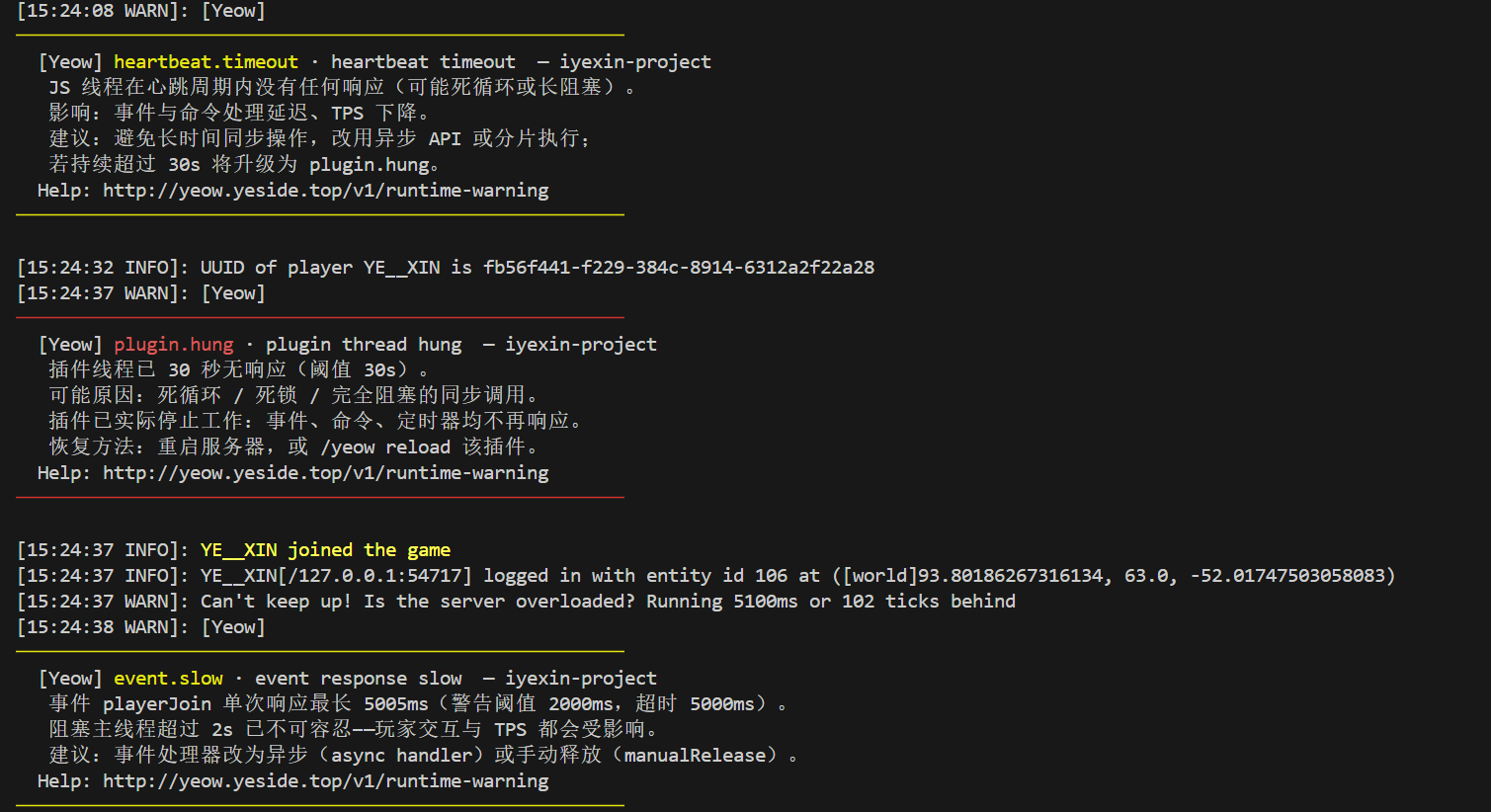
- Runtime warnings (heartbeat timeout, event timeout, etc.) → Runtime Warning Guide
- Detailed architecture and thread model → Advanced Knowledge
Documentation Package and Sitemap
- Sitemap: Structure of all documentation pages (title + summary + URL), for AI agents / Vibe Coding to quickly locate materials: Sitemap
- Documentation Package: All Markdown source code (including sitemap) packaged for download, for offline reading / feeding to AI: docs.zip (generated during build, zip format)